
SYSTEMS & WORKFLOW DESIGN
Redesigning a Legacy Intranet for a New Platform
Migrating to a global platform while improving usability, ownership, and adoption
MY ROLE
Lead UX Content Designer
PLATFORM
Beezy (Sharepoint)
TIMELINE
Jan. 2019- Mar. 2019
AUDIENCE
500+ Employees
DELIVERABLES
Content Strategy, IA, Wireframes, UX Writing, Governance
OUTCOME
Created a scalable intranet structure for easier content discovery
OVERVIEW
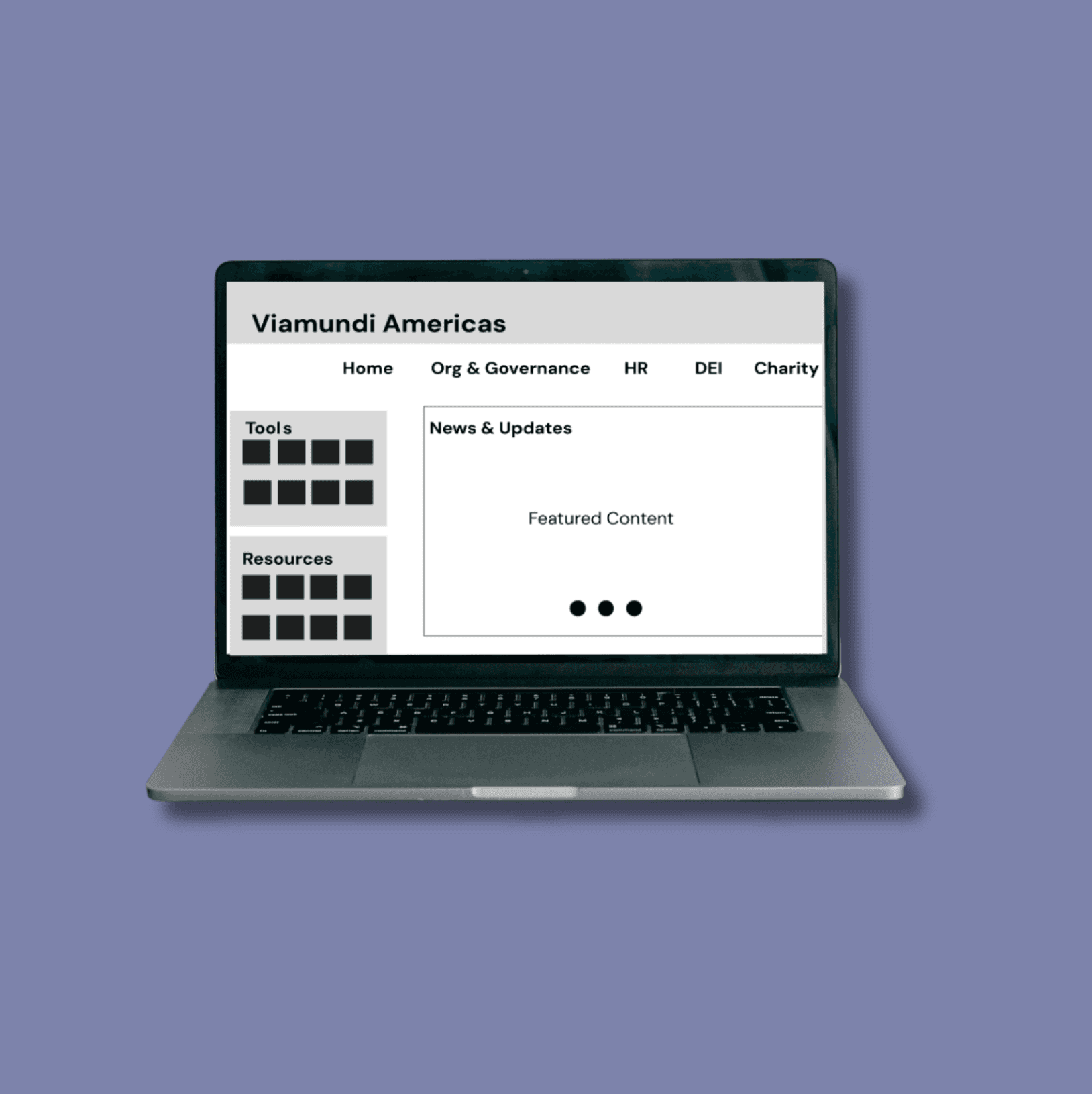
Amundi US migrated its legacy intranet to the parent company’s Beezy/SharePoint platform as part of a global alignment effort.
I led the redesign of the content structure and navigation, transforming a fragmented, static intranet into a more usable and scalable employee experience while preserving critical local resources. I configured and applied Beezy/SharePoint page templates and navigation components, reorganizing content within the platform to support the new information architecture.
CHALLENGES
Employees struggled to find information due to the large volume of fragmented and outdated legacy content
Global platform template limited local customization
Content ownership was not clearly defined, and SMEs were not accustomed to maintaining their own content
GOALS
Improve findability of tools, forms, and company resources
Create a scalable information architecture for future growth
Reduce reliance on email by centralizing internal communication and resources
Establish clear ownership so content stays current after launch
Create a centralized communication hub for company news, resources, and employee engagement
BEFORE
Functioned primarily as a static information hub with no opportunities for employee communication or engagement
Multiple disconnected intranet pages across departments
Inconsistent navigation and labeling
Redundant and outdated content
Difficult for employees to find key information
AFTER
Transformed into a more dynamic employee experience with ongoing updates, engagement features, and mobile accessibility
Reduced duplication and improved findability across departments and resources
Established clearer content ownership by enabling SMEs to directly manage their sections
Created clearer pathways to high-priority tools, policies, and employee resources
INFORMATION ARCHITECTURE
As part of the intranet migration, I redesigned the information architecture to improve how employees find and access critical resources. The existing site was organized around departments, resulting in duplicate content, inconsistent navigation, and information that was difficult to locate.
I restructured the experience around employee needs, creating dedicated areas for frequently used tools, resources, company news, and employee engagement. To support long-term governance, I established content ownership with subject matter experts (SMEs), trained contributors, and implemented a sustainable process for maintaining content quality.
KEY DECISIONS
I approached this project as both a content design and information architecture challenge, focusing on improving how employees find, understand, and contribute information within a global platform.
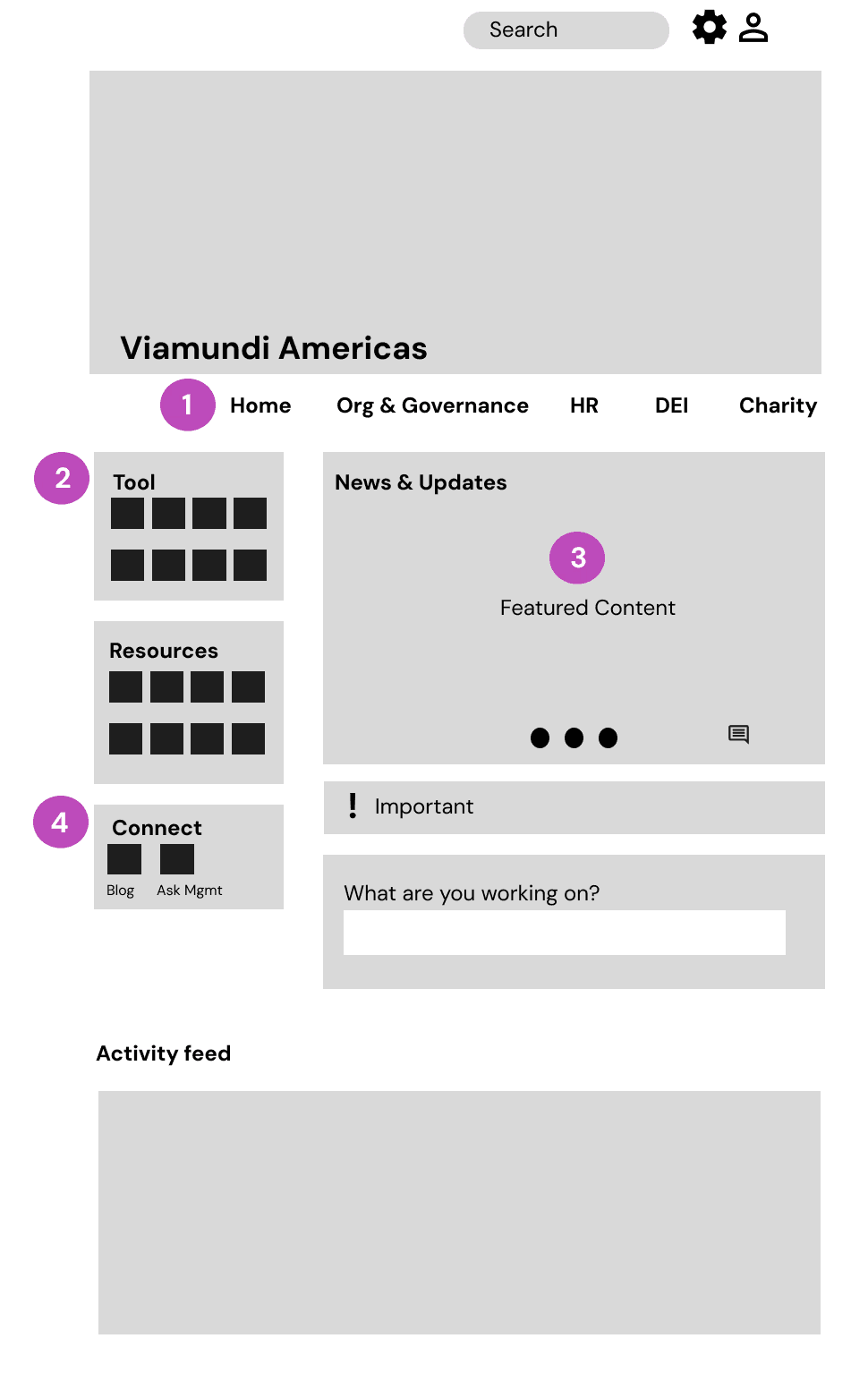

Replaced department-driven content with centralized, reusable structures
Reduced duplication and created a consistent source of information for shared resources like org charts and governance content.

Prioritize quick access to key tools and resources
Reduced friction by surfacing frequently used links, minimizing reliance on email and navigation.

Centralized company news into a single, dedicated content area
Improved discoverability and ensured employees could consistently access important updates.

Enabled employee engagement through dedicated communication channels
Introduced the WeConnect blog and “Ask Management” forum to support employee interaction and provide direct access to leadership.
Supporting Design Decisions:
Audit and consolidate existing content
Reviewed legacy intranet content to remove duplication, outdated information, and gaps, avoiding a lift-and-shift migration.
Enable stakeholder ownership and collaboration
Partnered with stakeholders and SMEs to define clear ownership for ongoing content maintenance.
Validate experience before launch
Tested the intranet pre-launch, identified issues, and partnered with developers to implement fixes.
USER FLOW EXAMPLE
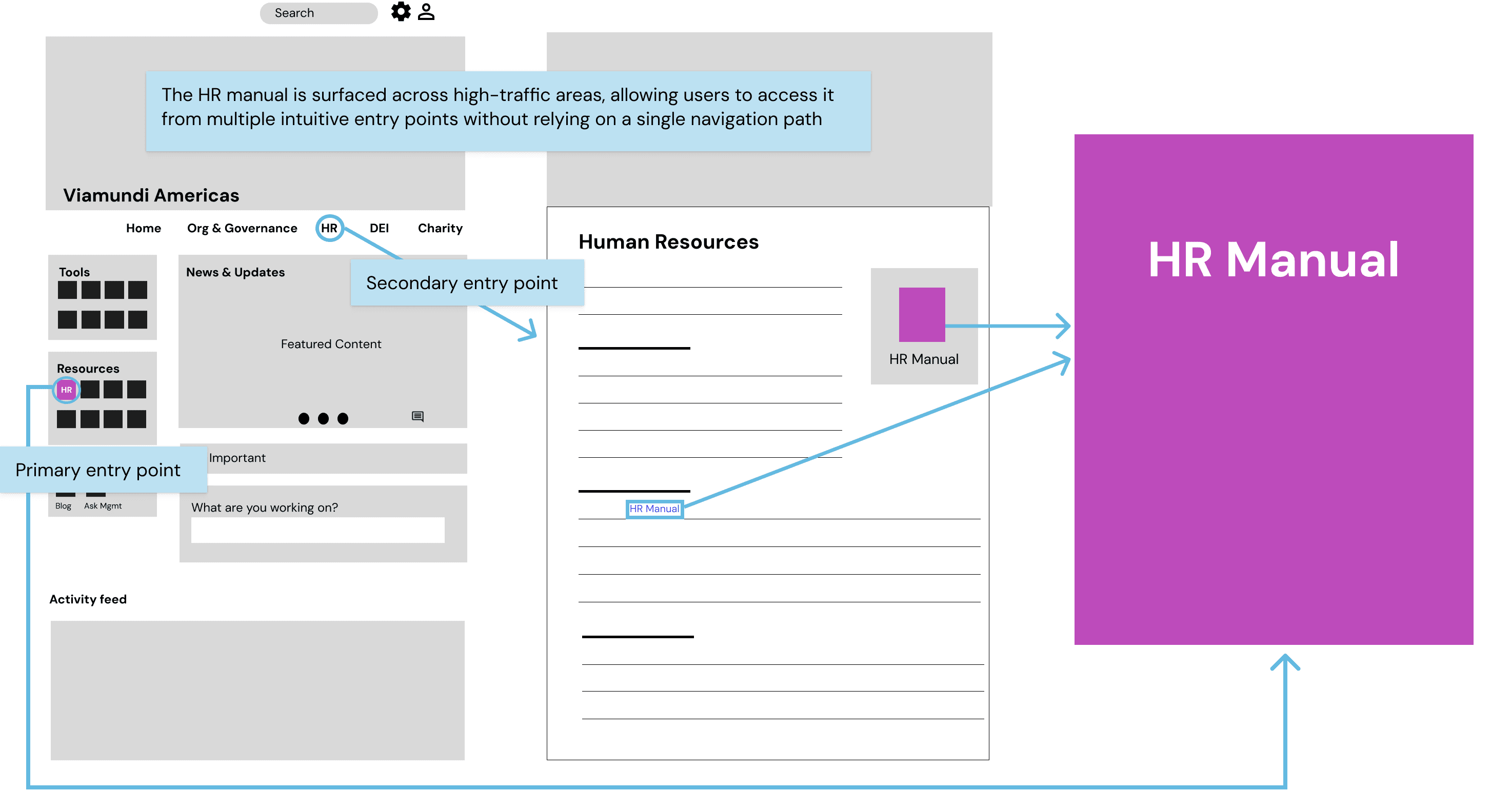
User Flow to access Human Resources Manual
The HR Manual was one of the most frequently accessed resource on the intranet, but employees were reaching it from different starting points. Rather than relying on a single navigation path, I surfaced it in two places, directly on the homepage as the first listed resource, and within the Human Resources section. Employees could find it whether they were scanning the homepage or searching the Human Resources page. The diagram below shows both paths.
Outcome
The intranet became the default homepage for employees across the Americas region, serving as a central hub for communication, tools, and company resources
Created a more unified experience through consistent navigation and centralized content structure
Reduced duplication and improved findability across departments and resources
Established content ownership across 5 dedicated SMEs, enabling ongoing updates without design or communications support
Created clearer pathways to high-priority tools, policies, and employee resources, reducing the frequency of requests to contact support